Thursday, July 8, 2010

Standard exit codes - shell scripts versus binaries

This short article is prompted by the question "What return codes should I use in my shell script?"

Some Answers:
  • A non-zero value
  • A non-zero value in the ranges 1 through 127 and 138 through 255
  • A non-zero value in the ranges 1 through 63, 79 through 127, and 138 through 255
The first answer is certainly correct.

The remaining answers are really a matter of personal preference.


Exit codes 128 through 137:

If a process is terminated by a signal then the standard behaviour is to take the numeric value of the signal, add 128, and use that value as exit code.

128+SIGNAL

So kill -9 someprocess should in theory see the process exit with code 137

There are more than 9 signal codes so you could, if you wish, avoid some of the codes 138 onwards to be absolutely sure.

( Avoiding 128 through 159 might be your preference )

The signal codes for Linux are described here.


Exit codes 64 through 78:

From the Linux exit manpage at kernel.org:
BSD has attempted to standardize exit codes; see the file <sysexits.h>
The actual meanings of the codes are given in this OpenBSD page, but I reproduce the first (64) and last (78) directly give you a flavour:

  • EX_USAGE (64) The command was used incorrectly, e.g., with the wrong number of arguments, a bad flag, a bad syntax in a parameter, or whatever.
  • EX_CONFIG (78) Something was found in an unconfigured or misconfigured state.

Shell script return codes - my personal suggestion:

Have a quick look through the OpenBSD range 64 to 78 and find something suitable. Then add 100 to that code.

First Example (code 175):

75 in OpenBSD says:
Temporary failure, indicating something that is not really an error. In sendmail, this means that a mailer (e.g.) could not create a connection, and the request should be reattempted later.

( Now adding 100 give 175 which I use )


Second Example (code 178):

78 in OpenBSD says:
Something was found in an unconfigured or misconfigured state.
( Now adding 100 gives 178 which I use )


The bash scripting guide notes (tldp.org):

Appendix D gives some guidance about exit codes.


Linux documentation of sysexits.h (permission of BSD):

#define EX__BASE 64 /* base value for error messages */
#define EX_USAGE 64 /* command line usage error */
#define EX_DATAERR 65 /* data format error */
#define EX_NOINPUT 66 /* cannot open input */
#define EX_NOUSER 67 /* addressee unknown */
#define EX_NOHOST 68 /* host name unknown */
#define EX_UNAVAILABLE 69 /* service unavailable */
#define EX_SOFTWARE 70 /* internal software error */
#define EX_OSERR 71 /* system error (e.g., can't fork) */
#define EX_OSFILE 72 /* critical OS file missing */
#define EX_CANTCREAT 73 /* can't create (user) output file */
#define EX_IOERR 74 /* input/output error */
#define EX_TEMPFAIL 75 /* temp failure; user is invited to retry */
#define EX_PROTOCOL 76 /* remote error in protocol */
#define EX_NOPERM 77 /* permission denied */
#define EX_CONFIG 78 /* configuration error */
#define EX__MAX 78 /* maximum listed value */ 


If you have the Linux source installed then the file /usr/include/sysexits.h contains the text pasted above.

Tuesday, June 29, 2010

Upgrading a VPS to a 2010 version of Linux - signalfd() test

The successful running of VPS servers for, Xen and OpenVZ, relies on compatibility between the underlying host Kernel and the requirements for Linux as a Guest.

Modern Linux versions (2010) may have difficulty running atop of some of the aging host containers employed by VPS companies.

In particular many VPS host containers provider Kernel facilities first implemented in 2007, with more modern features missing.

Testing if your Kernel supports signalfd():

If you are fairly certain that your VPS supports modern Linux (provides Kernel 2.6.26 to your container), then the Linux Test Project (described at end of article) will be enough to confirm things.

It is perhaps more likely that you do not know if you have signalfd() support, and want to do a test function call.

The signalfd() manpage provides a good summary and some test code:
signalfd() is available on Linux since kernel 2.6.22. Working support is
provided in glibc since version 2.8. The signalfd4() system call (see NOTES) is available on Linux since kernel 2.6.27.

Extract from the test code:


for (;;) {
s = read(sfd, &fdsi, sizeof(struct signalfd_siginfo));
if (s != sizeof(struct signalfd_siginfo))
handle_error("read");

if (fdsi.ssi_signo == SIGINT) {
printf("Got SIGINT\n");
} else if (fdsi.ssi_signo == SIGQUIT) {
printf("Got SIGQUIT\n");
exit(EXIT_SUCCESS);
} else {
printf("Read unexpected signal\n");
}
}

The full code is available in the manpage on kernel.org, and for convenience there is also a copy in this directory.

In the above loop, pay particular attention to the item fdsi.ssi_signo, as some outdated manpages may have an old reference.

( I describe this in detail in README.txt )

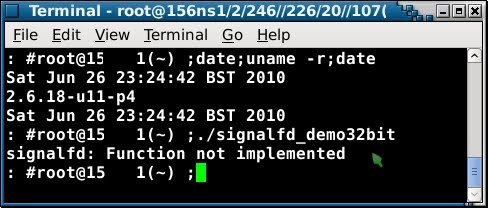
Examples of running signalfd_demo32bit on VPS:


The example above shows a failure message, as this VPS does not have access to
a host kernel which implements signalfd()


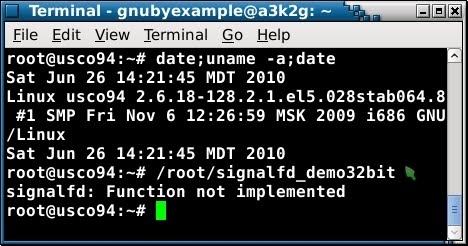
Another failure giving the same message 'function not implemented'

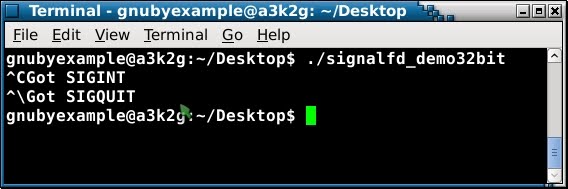
Now here I show a working example on a local Debian Squeeze install:


If signalfd() is supported by the running Kernel then you running signalfd_demo should make your system wait for input.

Pressing Ctrl+C should say 'Got SIGINT'
and Pressing Ctrl+\ should say 'Got SIGQUIT'

Warning: If you have redefined Ctrl+\ to be intercepted by screen or some graphical tool, then you are going to have difficulty getting out of the test!

Summary of expected responses:
  • Your Kernel is 2.6.18 and/or does not support signalfd()
    'Function not implemented'

  • Your Kernel supports signalfd()
    Your system should enter a 'wait' state until
    you press Ctrl+C or Ctrl+\ after which
    it should respond with 'Got SIGINT' or 'Got SIGQUIT' as appropriate
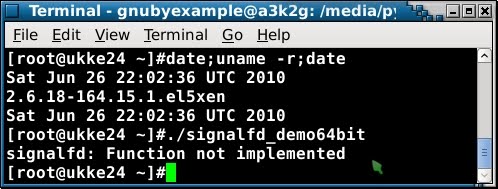
Examples of running signalfd_demo64bit on 64 bit VPS:


'Function not implemented' and again below another 'signalfd: Function not implemented':


and now a success for OpenVZ running a patched Kernel 2.6.18:


Ignore the echo statement which is just a way of me highlighting this surprising result.


Patching 2.6.18 to give signalfd() support - pros and cons:

Arguing the thing both ways...

Pros:
  • Hundreds of thousands of VPS containers may be able to successfully deploy Debian Squeeze and the latest Ubuntu (if signalfd() support is patched in)

Cons:
  • Confusion. Wholescale backporting of features to a Kernel tree that is over 3 years old seems like a mistake to me. ( Upgrading the underlying container software to RedHat 6 or CentOS 6 really feels to me to be a better solution )

  • Lack of easily scriptable tests. Already there are scripts out there that check for Kernel 2.6.26 or newer (see ltp below for example). If patching 2.6.18 becomes widespread, then scripts that test the Kernel version number to determine signalfd() support will become less useful.

Linux Test Project and signalfd():

When I was searching around for a way of testing for signalfd() support, I read about the Linux Test Project, and installed some software:

apt-get --no-install-recommends install ltp-kernel-test

You can leave out the --no-install-recommends but be warned that you will pull down a lot of packages if you decide to go that way.

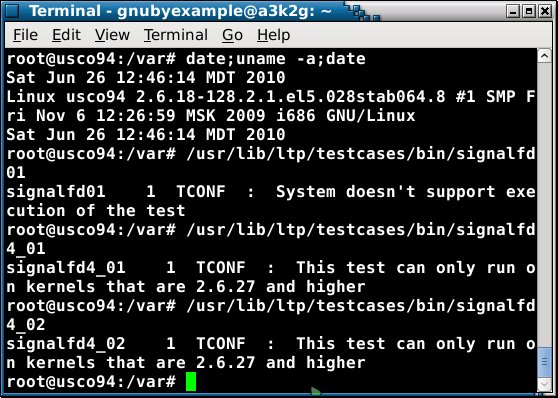
Here are ltp tests running on a local 32 bit desktop install of Debian Squeeze:


and this result is less successful:


signalfd4() versus signalfd():

Newer Kernels of the ( 2.6.2x and 2.6.3x series ) implement signalfd4().

I quote directly from the manpage to explain their relationship:

Starting with glibc 2.9, the signalfd() wrapper function will use signalfd4() where it is available.

If you feel that there is merit in adapting the signalfd_demo.c code, to use signalfd4() instead, then there is perhaps some work to do there - feel free to take this on as an exercise in C.

Further reading and links: